
Here’s something most “best Employee Engagement tools” lists won’t tell you: the software is rarely the reason an engagement program fails. The usual culprit is that nobody does anything with the feedback. Employees fill out a survey, hear nothing back for three months, and quietly decide that being honest isn’t worth the effort.
The right employee engagement tool can solve that. It makes it simple to share feedback, helps managers see what their team is saying, and encourages them to take action before the next survey even goes out.
I reviewed the top guides on this topic, compared the vendors those guides recommend, and checked what they offer right now along with current pricing. This guide brings everything together in one place, with a straightforward recommendation for which tool makes the most sense for different types of companies. You’ll find
- What employee engagement tools actually do, and the five main types
- The features that separate a useful platform from an expensive survey form
- A side-by-side comparison of 14 leading tools, with pricing where it’s public
- A practical rollout plan, plus the mistakes that sink most programs
- Answers to the questions HR teams ask most
If you only have two minutes, jump to the comparison table. If you’re about to sign a contract, read the whole thing.
What are employee engagement tools ?
Employee engagement tools are software that help you understand how people feel about their work, and then do something useful with that information. At a minimum, they collect feedback. The good ones also help managers spot problems early, recognize good work, and track whether things are actually getting better.
The tricky part is that “engagement tool” covers a lot of very different products. A pulse survey app and a peer recognition platform both fall under the umbrella of “engagement software,” but they’re designed to solve very different problems. Choosing the wrong one is a costly mistake, so it helps to get clear on the categories before you buy.
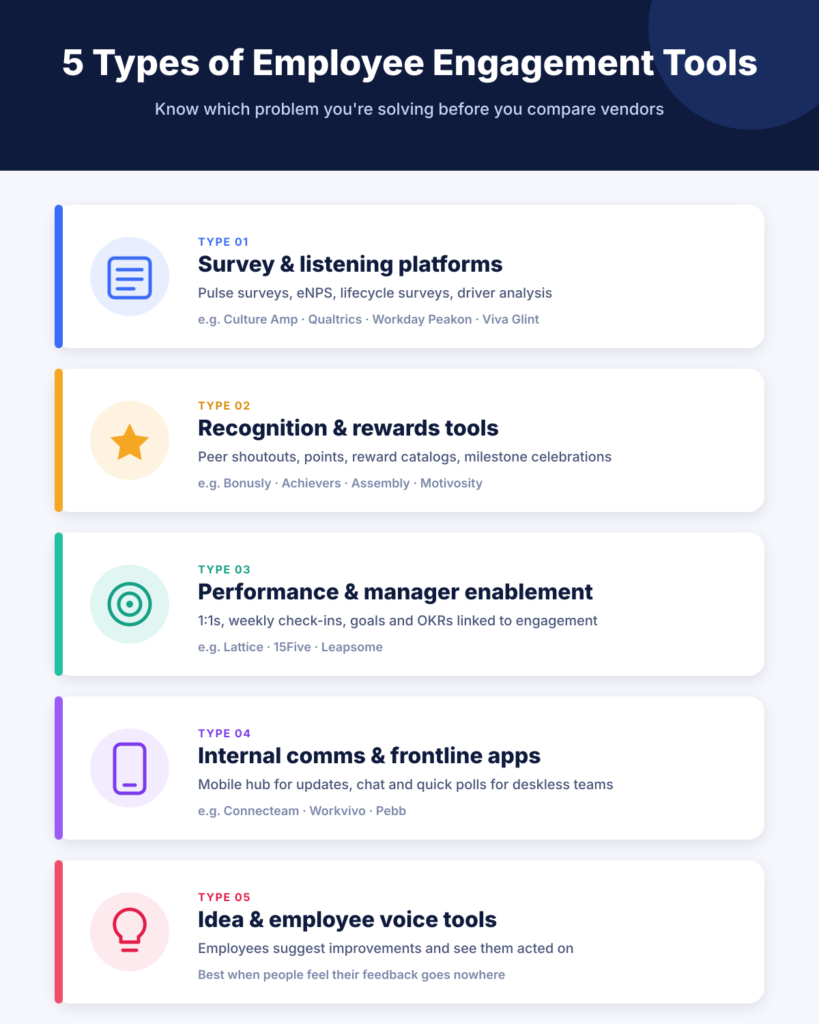
The 5 main types of employee engagement tools
- Survey and listening platforms:- They run engagement surveys, quick pulse checks, eNPS, and lifecycle surveys (like onboarding and exit). Then they turn people’s responses into things like scores, heatmaps, and driver analysis. Examples include Culture Amp, Qualtrics, CultureMonkey, Workday Peakon, and Viva Glint.
-
Recognition and rewards tools:- These make appreciation visible and frequent through peer shoutouts, points, and reward catalogs. Examples: Bonusly, Achievers, Assembly, Motivosity.
-
Performance and manager enablement platforms:- These connect engagement surveys to 1:1s, goals, check-ins, and reviews, so feedback lands where managers already work. Examples: Lattice, 15Five, Leapsome.
- Internal communication and frontline apps. These keep deskless and distributed teams informed through a mobile hub for announcements, chat, and quick polls. Examples: Connecteam, Workvivo, Pebb.
- Idea and employee voice tools. These go one step past “how do you feel?” and give employees a structured way to suggest improvements and see them acted on. This category is often overlooked, but it can do a lot for engagement when people feel their input disappears.
Many vendors now sell bundles that span two or three of these types. That can be great for reducing tool sprawl, but always ask which module is the vendor’s real strength. Usually it’s the one they started with.
Engagement tools vs performance management software
People often mix these up. Engagement software is about how people feel about their work, and what’s driving those feelings. Performance software, on the other hand, focuses on what people deliver, using tools like goals, reviews, and development plans.
There’s some overlap at the manager level, which is why platforms like Lattice and 15Five offer both. If you only need one, start by looking at the problem that’s costing you the most right now.
How to choose an employee engagement tool: 7 things that actually matter
Every vendor demo looks impressive. Dashboards are colorful, AI summaries are slick, and the sales rep has a case study ready for your industry. These seven questions cut through that.
1. Does the anonymity hold up under pressure ?
If employees suspect their manager can see who said what, they’ll click “satisfied” on everything and move on. Almost every tool claims to be anonymous, so dig deeper. Ask the vendor three things: what the minimum group size is before results show (five is a common default), whether an admin can override it, and whether filters can be combined to expose a small group by elimination. Good tools hide a report when a filter would leave too few people.
2. Does feedback reach managers, or stop at HR ?
This is the big one. Gallup’s research found that managers account for at least 70% of the variance in team engagement. Yet plenty of tools route every result through an HR report that managers never open. Look for team-level dashboards, suggested actions based on low-scoring areas, and a simple way to assign an owner and a deadline.
3. Can it reach everyone on your payroll ?
Email surveys work fine for office teams. They fail badly in retail, manufacturing, healthcare, logistics, and hospitality, where many people don’t have a company inbox. If a large share of your workforce is deskless, start your shortlist with delivery channels: SMS, WhatsApp, QR codes, kiosks, and a decent mobile app. Features come second.
4. Does it explain why, not just what ?
An engagement score tells you whether things went up or down. Driver analysis tells you which factors (workload, recognition, career growth, leadership trust) are moving that score for your people. Add AI comment analysis that groups hundreds of open-text answers into themes, and you’ve saved HR days of reading.
5. Will it live where people already work ?
Slack and Microsoft Teams integrations are not a nice-to-have. A survey that pops up in the chat tool people already have open will get more responses than one buried in an email. HRIS sync matters too, because nobody wants to upload a CSV of the org chart every month.
6. Is the pricing honest about your real cost ?
Watch for annual-only billing, minimum contract sizes, engagement sold as an add-on to a bigger suite, and integrations that cost extra. Lattice, for example, publishes a $4,000 minimum annual spend. Several enterprise tools only quote after a sales call. None of that is a dealbreaker, but model the cost for your headcount 12 months from now, not today.
7. Can one busy person run it ?
If you’re a lean HR team, a platform that needs a dedicated analyst to produce a readable report will cost more in staff time than it saves. Ask how long setup takes, and who on the vendor side helps you through the first survey cycle.
Quick tip: Before any demo, write down the one problem you most want to solve, such as “managers don’t know their teams are burning out” or “our warehouse staff never answer surveys.” Then judge every tool against that one sentence.
The best employee engagement tools in 2026, compared
No single tool is perfect for everyone, so this list is organized by fit, not a fake “#1 overall” ranking.
The prices shown are the publicly listed starting points as of October 2026. Many vendors only quote after a demo, and annual billing is the norm.
| Tool | Type | Best for | Starting price |
|---|---|---|---|
| Culture Amp | Survey + performance | Mid-size teams that want strong benchmarks | Custom (reported from ~$4,500/yr) |
| Qualtrics EmployeeXM | Survey + analytics | Enterprises with a people analytics team | Custom |
| Lattice | Performance + survey | Linking engagement to reviews and goals | $11/user/mo + $4 engagement add-on |
| 15Five | Manager enablement | Weekly check-ins and 1:1s | From $4/user/mo |
| Leapsome | Performance + survey | All-in-one goals, reviews, and surveys | From ~$6/user/mo |
| Workleap Officevibe | Pulse surveys | Small teams that want to start fast | From ~$5/user/mo |
| Workday Peakon | Survey + analytics | Companies already on Workday | Custom |
| Microsoft Viva Glint | Survey + analytics | Microsoft 365 organizations | Microsoft licensing |
| CultureMonkey | Survey + listening | Frontline and multilingual workforces | Custom |
| WorkTango | Survey + recognition | Surveys and recognition in one place | Custom (reported from ~$8,000/yr) |
| Bonusly | Recognition | Everyday peer-to-peer recognition | Free up to 8 users; then ~$3/user/mo |
| Achievers | Recognition | Large, global recognition programs | Custom |
| Connecteam | Frontline app | Deskless teams who live on their phones | From $29/mo for the first 30 users |
| ThriveSparrow | Survey + recognition | Budget-friendly AI survey analytics | From ~$2–3/user/mo |
Quick picks if you’re short on time
- Under 100 employees, tight budget: Workleap Officevibe or ThriveSparrow for surveys; Bonusly’s free plan for recognition.
- Mid-size company, desk-based: Culture Amp if benchmarks matter most; Lattice or 15Five if you want performance in the same tool.
- Large enterprise with analysts: Qualtrics EmployeeXM.
- Already on Workday or Microsoft 365: Workday Peakon or Viva Glint. The native data sync is worth a lot.
- Frontline-heavy workforce: CultureMonkey for surveys, Connecteam for daily communication.
- Recognition is the main gap: Bonusly for smaller teams, Achievers for global enterprises.
1. Culture Amp
Best for: Mid size, desk-based companies that want to compare themselves against a huge benchmark dataset.
Culture Amp is one of the most established names in the category, used by more than 6,000 companies. Its survey templates were built with organizational psychologists, and its benchmark data covers over a billion survey responses, which helps leaders read their scores in context. The AI Coach feature now turns survey results into suggested action plans and even drafts the follow-up message to the team.
- Why people like it: trustworthy question library, strong benchmarks, engagement and performance in one suite.
- Watch out for: custom pricing that suits mid-market budgets more than small teams, and reporting that takes some learning.
- Skip it if: most of your people don’t have a work email, or you don’t need external benchmarks.
2. Qualtrics EmployeeXM
Best for: Large enterprises with a dedicated people analytics function.
Qualtrics is the heavy machinery of this list. It handles predictive attrition modeling, advanced text analytics, and complex org-hierarchy reporting across dozens of listening programs. If your HR team includes data analysts, it can answer questions most other tools can’t.
- Why people like it: analytics depth, segmentation, and executive-ready reporting.
- Watch out for: enterprise pricing and a steep learning curve for new admins.
- Skip it if: your HR team runs surveys without analyst support. You’ll pay for power you won’t use.
3. Lattice
Best for: Companies that want engagement, reviews, goals, and 1:1s in one place.
Lattice puts survey results right next to 1:1 notes, OKRs, and review cycles, so managers see engagement as part of the job rather than a separate HR task. It includes Mercer-backed benchmarks, AI theme analysis, heatmaps, and action plans.
- Why people like it: everything connects, and it’s well suited to manager routines.
- Watch out for: engagement is an add-on ($4/user/mo) to the $11 talent suite, with a $4,000 annual minimum. Admin features on mobile are limited.
- Skip it if: you only need surveys and don’t want to pay for a full performance suite.
4. 15Five
Best for: Teams that want weekly signals instead of quarterly surveys.
15Five is built around rhythm. Employees answer short weekly check-ins, managers run structured 1:1s, and those inputs feed into reviews later. That means disengagement shows up within days, not at the next survey. At around $4 per user per month for the engagement plan, it’s one of the most affordable dedicated options.
- Why people like it: strong 1:1 tools, a good habit loop, low entry price.
- Watch out for: notification overload if you don’t tune the defaults, and richer outcome dashboards sit on higher tiers.
- Skip it if: you need multilingual frontline surveys.
5. Leapsome
Best for: Growing companies that want goals, reviews, learning, and surveys in a modern interface.
Leapsome gets consistent praise for its clean design and for making everything connect: OKRs, review cycles, engagement surveys, and learning modules. Its AI also helps people write more useful feedback.
- Why people like it: modern UI, modular pricing, good AI writing help.
- Watch out for: it can feel like a lot at first, and some flows take extra clicks.
- Skip it if: you want a pure, lightweight survey tool.
6. Workleap Officevibe
Best for: Small teams that want a working feedback loop in an afternoon.
Officevibe sends short, automated pulse surveys from a science-backed question bank, so there’s very little to configure. Managers get plain-language explanations of results, AI-suggested actions, and help replying to anonymous comments. Good Vibes adds simple peer recognition. Results for groups under five people are hidden to protect anonymity.
- Why people like it: fastest time to value, very easy for managers.
- Watch out for: you can’t replace its question set with your own engagement model, and support can be slow.
- Skip it if: you already have a custom engagement framework you want to keep.
7. Workday Peakon Employee Voice
Best for: Organizations that already run Workday HCM.
Peakon’s biggest advantage is native sync with Workday: reporting lines, tenure, and org changes flow in automatically, with no spreadsheet uploads. It runs always-on pulse surveys with strong benchmarks and AI summaries of comments.
- Why people like it: zero data wrangling, good continuous listening.
- Watch out for: setup is complex without a People Ops owner, and some advanced AI may need an extra subscription.
- Skip it if: you’re not on Workday. Its main edge disappears.
8. Microsoft Viva Glint
Best for: Companies that run on Microsoft 365 and Teams.
Viva Glint delivers surveys inside Teams, so employees don’t need another login. It offers heatmaps, benchmarks, AI comment summaries, and guided team conversations for managers.
- Why people like it: zero friction for Microsoft-first companies, strong manager enablement.
- Watch out for: dashboards take some getting used to, and anonymity is harder to protect in very small teams.
- Skip it if: Microsoft 365 isn’t your main workplace stack.
9. CultureMonkey
Best for: Enterprises with frontline, deskless, or multilingual workforces.
CultureMonkey’s standout is reach. Surveys go out in 100+ languages through email, Slack, Teams, WhatsApp, SMS, QR codes, and kiosks, which solves the problem of hearing from people who never check a work inbox. Manager dashboards include action tracking, and an AI assistant answers plain-English questions about results.
- Why people like it: unmatched delivery channels, hands-on support, solid action planning.
- Watch out for: no public pricing, and it may be more than a small company needs.
- Skip it if: you’re under a few hundred desk-based employees.
10. WorkTango
Best for: Teams that want engagement surveys and recognition from one vendor.
WorkTango combines unlimited customizable surveys with a recognition and rewards program. Open-text answers are summarized with AI, and managers can respond to anonymous comments without revealing who wrote them.
- Why people like it: one tool instead of two, strong analytics and benchmarking.
- Watch out for: annual-only billing with a minimum commitment, no free trial, and a busy interface at first.
- Skip it if: you’re a very small company with simple needs.
11. Bonusly
Best for: Making peer recognition an everyday habit.
Bonusly turns appreciation into a visible company feed. Employees give each other small point awards with a note and a hashtag tied to a company value, then redeem points from a catalog of 1,200+ gift cards across 200+ countries, or donate them. It works inside Slack and Teams with one click.
- Why people like it: high adoption, fun, a free plan for up to 8 users.
- Watch out for: analytics are basic compared with survey platforms, and reward options are thinner outside the U.S.
- Skip it if: what you really need is to measure engagement, not reinforce it.
12. Achievers
Best for: Large, global companies running a serious recognition program.
Achievers is built for enterprise scale. Recognition happens inside Teams and Slack, managers get reminders to recognize people and mark milestones, and the rewards system works across many countries and 30+ languages. Reporting exports cleanly to BI tools like Power BI.
- Why people like it: proven adoption at scale, strong integrations.
- Watch out for: custom pricing aimed at 500+ employees.
- Skip it if: you just want lightweight shoutouts for a small team.
13. Connecteam
Best for: Deskless teams in retail, field service, hospitality, or construction.
Connecteam is less a survey tool and more a mobile hub: announcements, chat, quick surveys, recognition, training, scheduling, and a time clock all in one app. That’s exactly why frontline employees actually open it.
- Why people like it: mobile-first, quick to adopt, replaces messy WhatsApp groups.
- Watch out for: engagement analytics are shallow compared to dedicated survey platforms.
- Skip it if: your team is mostly office-based.
14. ThriveSparrow
Best for: Small and mid-size teams that want AI-driven survey insights on a budget.
ThriveSparrow offers customizable pulse surveys, flexible anonymity settings, AI sentiment analysis that groups comments into themes, heatmaps by department or tenure, and simple action plans. Pricing is transparent and low.
- Why people like it: strong features for the price, delivery via Slack, Teams, email, or SMS.
- Watch out for: a younger company, some integrations cost extra, and there’s no admin mobile app.
- Skip it if: you need deep enterprise governance.
Free and low cost options worth knowing
If you’re just starting out, you don’t need a big platform on day one. Microsoft Forms (included with Microsoft 365) or a free form builder can run a quarterly anonymous survey. Pebb has a free plan for internal chat and team updates. Assembly and Bonusly both offer free tiers for recognition. Just know that these won’t give you driver analysis or manager dashboards, and most growing teams outgrow them within a year.
How to roll out an employee engagement tool so people actually use it
Buying the software is the easy part. Here’s a simple rollout plan that works for most teams.
- Pick one problem to solve first:- Retention in one department, low trust in leadership or burnout on a specific team. A narrow goal makes your first survey sharper and your results easier to act on.
- Brief managers before employees:- Managers should know what’s coming, what they’ll see, and what’s expected of them afterward. Surprised managers get defensive.
- Explain anonymity in plain language:- Tell employees exactly who sees what, and the minimum group size. Vague promises of “confidential” make people suspicious.
- Start with a short survey:- Ten to fifteen questions plus one or two open-text boxes. You can add pulse surveys later.
- Share results within two weeks:- Even a short “here’s what we heard” message builds trust. Silence kills it.
- Commit to two or three actions, not ten:- Each action needs an owner and a date. Post them where people can see them.
- Close the loop in the next survey:- Tell people what changed because of their feedback. This is what turns a survey into a habit.
6 common mistakes that sink engagement programs
- Treating the tool as the strategy:- Software collects data. Leaders have to act on it.
- Surveying too often with nothing to show for it:- Monthly pulses are great, but only if something visibly changes between them. Otherwise, survey fatigue sets in fast.
- Keeping results inside HR:- If managers never see their own team’s data, nothing changes at the team level, which is where engagement actually lives.
- Ignoring frontline workers:- An email-only survey in a company where half the staff work on a shop floor gives you a distorted picture.
- Buying the biggest suite:- Unused modules cost money and confuse employees. Start with what you need and expand later.
- Forgetting recognition:- Measuring engagement without ever celebrating good work is like taking someone’s temperature and never offering a glass of water.
Frequently asked questions about employee engagement tools
What are employee engagement tools ?
They’re software platforms that help companies measure and improve how employees feel about their work. Most run surveys and show results by team. Others focus on recognition, internal communication or connecting engagement to performance reviews.
What’s the difference between engagement software and an engagement platform ?
In practice, people use the terms interchangeably. “Platform” usually suggests a broader system with surveys, manager dashboards, action plans and sometimes performance features, while “tool” or “software” can describe something more focused.
How much do employee engagement tools cost ?
Most dedicated tools cost between $2 and $15 per user per month. Budget options like ThriveSparrow, 15Five, and Officevibe sit at the low end. Enterprise platforms such as Qualtrics, Culture Amp, Workday Peakon and CultureMonkey use custom pricing based on headcount and modules. Free options exist for basic surveys and recognition.
Are employee engagement surveys really anonymous ?
They should be, if the tool enforces a minimum group size before showing results (commonly five people) and blocks filters that could single out a small group. Always ask the vendor whether admins can override these settings.
How often should we run engagement surveys ?
A common rhythm is one full engagement survey a year, plus short pulse surveys monthly or quarterly. The right frequency is the one you can actually respond to. If you can’t act on results monthly, survey quarterly.
What’s the best employee engagement tool for small businesses ?
For most small teams, Workleap Officevibe, 15Five or ThriveSparrow give you real engagement features at a low per-user price. Add Bonusly’s free plan if you also want peer recognition.
Do employee engagement tools improve retention ?
They can, because they surface problems like burnout or a struggling manager before people resign. But the tool only helps if leaders act on what it shows. Feedback that goes nowhere can actually make engagement worse.
What features matter most in an engagement tool ?
Strong anonymity, manager level dashboards, driver analysis, AI comment analysis, Slack or Teams delivery, HRIS integration, and built-in action planning. For frontline teams, add mobile, SMS or kiosk access.
The best employee engagement tool is the one your managers will actually use and your employees will actually trust. For data heavy enterprises, that’s probably Qualtrics or Culture Amp. For Workday or Microsoft shops, it’s the native option. For frontline workforces, delivery channels matter more than anything. And for small teams, a simple, affordable pulse tool beats an expensive suite every time.
Whatever you choose, employee engagement tools remember the order of operations: listen, share what you heard, act and show people what changed. The software just makes that loop faster.